
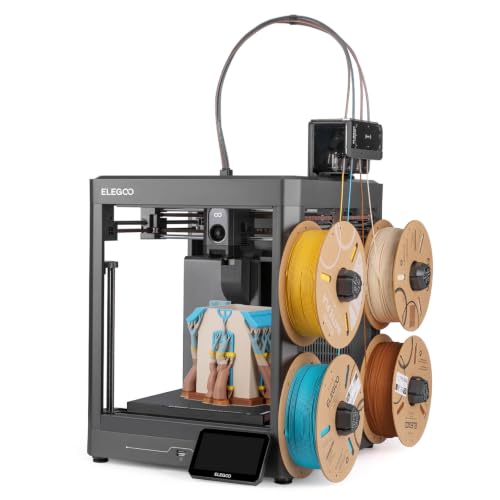
- Lock-in on a 3D printer means three separate things: a required maker account, a firmware layer that gates features, and how easy it is to get parts if the maker's ecosystem changes.
- Bambu's Jan 2025 authorization update gates cloud, remote and slicer control on printers already sold, while leaving local SD-card printing untouched.
- Prusa's firmware carries no such gate: Prusa states its firmware is fully open-source, though its bootloader stays locked.
- The Elegoo Centauri Carbon 2 Combo and Prusa printers need no ongoing cloud account for local printing; Bambu's printers require a one-time account bind even in LAN-only mode.
- Parts availability is the least-discussed lock-in risk: Bambu names individual spare parts through its own store, but does not publish the sold-vs-printable breakdown Prusa does.
Quick answer: Ecosystem lock-in on a 3D printer is three separate things: a required maker account, firmware that can gate features you already paid for, and how hard replacement parts are to get later. Only the ELEGOO Centauri Carbon 2 Combo and Prusa’s printers need no maker account for local printing, and Bambu’s January 16, 2025 authorization update gates cloud, remote and slicer control on printers already sold.
Does a 3D printer need a maker account to print?
Bambu Lab’s printers require a one-time account bind even before LAN-only mode, per Bambu’s wiki: “to bind a printer for remote control, you will first need to use the Login/Register button.” The account step isn’t optional; after that bind, LAN Only keeps print traffic local. Elegoo’s Centauri Carbon 2 Combo and Prusa’s printers need no maker account at all for local printing.
Can a printer maker gate features with a firmware update?
Yes, it can. Bambu Lab’s January 16, 2025 blog post announced an authorization system gating binding/unbinding, remote video, firmware upgrades, print-job initiation and motion/temperature/AMS control, on printers already sold. It did not gate printing from an SD card. Prusa’s printers carry no comparable gate; Prusa calls its firmware “completely open-source,” though its bootloader stays locked.
How hard is it to get replacement parts after buying?
It depends on the maker. Bambu’s US store sells named spare parts for its A1-series line individually, but doesn’t publish a sold-versus-printable breakdown the way Prusa does. Prusa’s help article splits its own parts into two documented groups: parts sold with the printer or on Prusa’s e-shop, and parts printed yourself from files on Printables or Prusa’s GitHub.
What does ecosystem lock-in mean for a first 3D printer?
None of this makes one brand universally “better.” Bambu is well served if you want the easiest day-one setup and accept a maker account and firmware terms that can change later. Prusa is better if you want a written no-lock-in policy. The ELEGOO Centauri Carbon 2 Combo sits in between: no account requirement, less parts history.
Which related guides explain lock-in further?
- Bambu without the cloud: LAN-only setup and no-cloud alternatives
- 3D printer warranty, support and replacement parts, compared
- Bambu A1 mini vs A1 vs P1S for a small space
Ecosystem lock-in questions
Does 'closed ecosystem' just mean the software?
Mostly, but not only. It covers three separate things: whether a maker account is required, whether firmware gates features after purchase, and how openly the maker documents and sells replacement parts. A printer can be closed on one axis and open on another.
Can I avoid Bambu's account requirement entirely?
Not on current Bambu printers. Even LAN-only mode requires a one-time account bind before it can be switched on, per Bambu's own wiki. Elegoo's Centauri Carbon 2 Combo and Prusa's printers need no account for local printing.
Does open firmware mean anyone can flash anything?
Not entirely. Prusa's firmware is open-source, but its bootloader stays locked, and flashing unsigned firmware requires a manual pin step Prusa added after issues on an earlier model. Open-source is a real difference, not an absolute one.
Sources we checked
- Bambu Lab blog: 'Firmware Update Introducing New Authorization Control System.' Source for the Jan 16, 2025 date and the list of gated operations.Manufacturer · blog.bambulab.com · checked
- Bambu Lab wiki: Remote Control & Monitoring (Bambu Studio). Source for the one-time account bind requirement even before switching to LAN-only mode.Manufacturer · wiki.bambulab.com · checked
- Prusa Research: 'Open-source at Prusa Research.' Source for the fully open-source firmware statement.Manufacturer · prusa3d.com · checked
- Prusa Knowledge Base: 'Printable parts for Original Prusa.' Source for the documented sold-vs-printable parts breakdown.Manufacturer · help.prusa3d.com · checked
- Bambu Lab US Store: Spare Parts for A1 Series collection. Source for named OEM parts sold individually, without a published sold-vs-printable breakdown.Manufacturer · us.store.bambulab.com · checked
- ELEGOO Wiki: How to Connect the Printer Using Elegoo Slicer and Elegoo Matrix App (Centauri Carbon 2 Combo). Source for "Settings → LAN Only → Enable LAN Only → Access Code (optional)" with no login step.Manufacturer · wiki.elegoo.com · checked
- Amazon: ELEGOO Centauri Carbon 2 Combo listing (ASIN B0G4TPZPZM), Source for this page's no-account pick, its price and its image.Retailer listing · amazon.com · checked