The shortlist, with today's price
Side by side
| Product | Best for | Price |
|---|---|---|
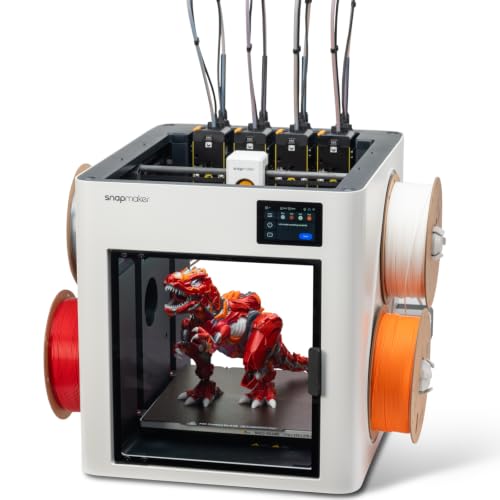
| Snapmaker U1Best for Low-Waste Color | Four-color prints where you want the maker's own swap time and waste numbers before you buy | $699.00 |
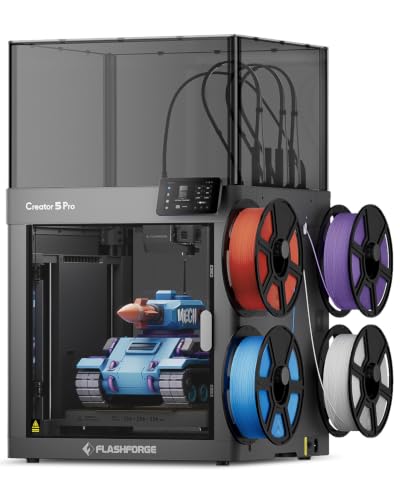
| Flashforge Creator 5 ProEnclosed Tool-Changer | Purge-free multi-material work that also needs a heated chamber for ABS or ASA | $749.00 |
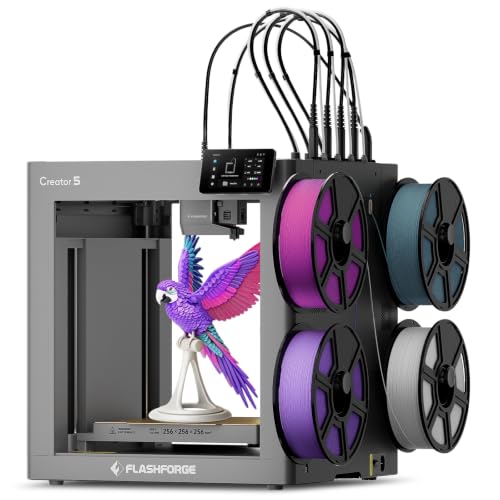
| Flashforge Creator 5Open-Frame Tool-Changer | Four-color PLA, PETG and TPU prints without purge, on an open frame | $599.00 |
Amazon prices as of Nov 23, 2026. Specs from each maker's own page, linked in each pick's build sheet.
On this page
Each pick, and when you'd outgrow it
Snapmaker U1
The one tool-changer here whose maker publishes both a swap time and a gram-level waste figure.
$699.00 at Amazon, as of Nov 23, 2026
Accessory: not on the printer path. Best for: Four-color prints where you want the maker's own swap time and waste numbers before you buy
Full build sheet
- "4 Toolheads. Direct Swaps in 5s.", per Snapmaker
- Gram figures published: 87.42 g of total waste against 586.02 g on a shared-nozzle printer for Snapmaker's Castle Tower example
- "Build Volume 270mm × 270mm × 270mm"
- Still prints a prime tower; Snapmaker's waste totals include it
- "Max Nozzle Temperature 300°C" with a "Stainless Steel" nozzle; ABS and ASA need the Top Cover, sold separately
Flashforge Creator 5 Pro
The same four-toolhead idea as the Creator 5 in a heated, filtered enclosure; the waste charts are pictures with no footnote on what they count.
$749.00 at Amazon, as of Nov 23, 2026
Accessory: not on the printer path. Best for: Purge-free multi-material work that also needs a heated chamber for ABS or ASA
Full build sheet
- "4 Independent Toolheads" and "Zero Purge Waste During Material Switching", per Flashforge
- "Enclosed Frame Design" with chamber heating "Supported (Max 65 °C)"
- "HEPA13 Filter + Activated Carbon"
- Flashforge's page states no swap time; its gram charts (109.56 g against 350 g on an octopus model) do not name the comparison printer
- 256 × 256 × 256 mm build, 14 mm short of the U1 on each axis
Flashforge Creator 5
Purge-free four-color printing on an open frame; Flashforge publishes gram charts but no swap time on its own page.
$599.00 at Amazon, as of Nov 23, 2026
Accessory: not on the printer path. Best for: Four-color PLA, PETG and TPU prints without purge, on an open frame
Full build sheet
- "All four toolheads can access the full 256 x 256 x 256 mm build area."
- "Zero Purge Waste During Material Switching", per Flashforge
- Amazon listing title: "7s FlashSwap Toolchanger"
- "Open Frame Design"; Flashforge points ABS, ASA and nylon buyers to the Creator 5 Pro
- Flashforge asks for 200 mm of clear space on the right side and 500 mm in front
- The pick: the Snapmaker U1 ($699.00 on Amazon as of Nov 23, 2026). Snapmaker lists "4 Toolheads. Direct Swaps in 5s." and "Up to 85% Less Waste.", and backs the waste claim with gram figures per model (87.42 g against 586.02 g for its Castle Tower example).
- Zero purge is not zero waste. Snapmaker's FAQ says the U1 "does still produce some waste in the form of a small tower called the prime tower". Flashforge's Creator 5 page says "Zero Purge Waste During Material Switching" and, a few lines lower, "Near-Zero Waste. Maximum Output."
- Swap time is published by one maker of three. Snapmaker states 5 seconds (a lab "typical result"). Flashforge's Creator 5 and Creator 5 Pro product pages state no swap time; the 7-second figure appears in the Creator 5's Amazon listing title. Prusa says only that tools are swapped "in seconds".
- Flashforge's waste numbers are in pictures, not footnoted. Charts on Flashforge's product pages put the Creator 5 at 47.5 g against 290 g for "Others" (a Rubik's cube model) and the Creator 5 Pro at 109.56 g against 350 g (an octopus model), labeled as less material; the pages do not name the comparison printer or say what the totals include, where Snapmaker's footnote does.
- Four colors means four, on a tool-changer. Flashforge says the Creator 5 prints "up to four colors in a single model"; Bambu Lab's H2C page says traditional toolchangers "limit color count by the number of toolheads".
- Still purging: the Bambu Lab P2S Combo and Flashforge AD5X switch colors through one nozzle, and the dual-nozzle Bambu Lab H2D is listed at 3032 g of purge and prime tower waste in Bambu's own example, against 532 g for the H2C.
The picks at a glance
Three tool-changers were In stock at Amazon on Nov 22, 2026. The pick is the Snapmaker U1 ($699.00 on Amazon as of Nov 23, 2026): 4 toolheads, “Direct Swaps in 5s” and “Up to 85% Less Waste” per Snapmaker, with a 270 mm cube build. The Flashforge Creator 5 Pro ($749.00 on Amazon as of Nov 23, 2026) adds a 65 °C heated enclosure around 4 toolheads and a 256 mm cube; the Flashforge Creator 5 ($599.00 on Amazon as of Nov 23, 2026) is the same 4-toolhead system on an open frame.
Warning before you buy: “zero purge” does not mean zero waste. Snapmaker’s FAQ says the U1 “does still produce some waste in the form of a small tower called the prime tower”, and its own waste totals count supports and that tower. Flashforge’s Creator 5 page says “Zero Purge Waste During Material Switching” and, in the next block, “Near-Zero Waste. Maximum Output.” Budget for a prime tower on every multicolor print.
Which multicolor printers swap toolheads instead of purging?
Three in stock, ranked by color-change method, then by what the maker publishes about swap time and waste. A tool-changer parks a loaded, preheated toolhead for each color; a single-nozzle system cuts the filament, loads the next one and flushes the old color out. Bambu’s wiki describes that flush: “Each time a nozzle must change from one filament to another, a small amount of filament is left in the extruder and nozzle”.
| Rank | Printer | How colors change (maker) | Swap time (maker) | Waste figure (maker) | Colors per print | Build (mm) |
|---|---|---|---|---|---|---|
| 1 | Snapmaker U1 | 4 separate toolheads | 5 s (“typical result” from Snapmaker Lab) | Up to 85% less; 87.42 g vs 586.02 g on the Castle Tower example | 4 | 270 × 270 × 270 |
| 2 | Flashforge Creator 5 Pro | 4 separate toolheads, enclosed | Not stated on Flashforge’s page | “Zero Purge Waste”; chart: 109.56 g vs 350 g for “Others” (octopus model) | 4 | 256 × 256 × 256 |
| 3 | Flashforge Creator 5 | 4 separate toolheads, open frame | Not stated on Flashforge’s page; 7 s in the Amazon title | “Zero Purge Waste”; chart: 47.5 g vs 290 g for “Others” (Rubik’s cube model) | 4 | 256 × 256 × 256 |
| Not ranked | Original Prusa XL 2-Toolhead (limited stock) | 2 separate toolheads on this listing | “in seconds”, no number | “Zero purge waste”; no number | 2 | 360 × 360 × 360 (Prusa’s XL+ page) |
| Not ranked | Bambu Lab H2C (no Amazon listing found) | Swaps hotends (Bambu’s Vortek system) | Not stated; Bambu lists 8-second induction heating | 532 g on Bambu’s Geminaraptor example | Up to 24 materials, per Bambu | 330 × 320 × 325 total |
Our finding, Nov 22, 2026: of the three tool-changer makers we read (Snapmaker, Flashforge and Prusa), Snapmaker alone puts a number on the swap on its own product page. Snapmaker lists “4 Toolheads. Direct Swaps in 5s.” Flashforge’s Creator 5 and Creator 5 Pro pages, including their spec tables and FAQ, give no swap time; the 7-second figure lives in the Creator 5’s Amazon listing title (“7s FlashSwap Toolchanger”). Prusa’s XL+ page says “Tools are swapped in seconds” without a number.
Our finding, Nov 22, 2026: a tool-changer’s color count stops at its toolhead count. Flashforge says the Creator 5 prints “up to four colors in a single model”. Bambu’s H2C page draws the same line from the other side, describing “traditional toolchanger printers that limit color count by the number of toolheads”. A 6-color figurine on a 4-toolhead printer means doubling up colors or going back to a purging system.
What does Snapmaker say about the U1’s waste?
Snapmaker publishes the most specific numbers here: “Up to 85% Less Waste.” and four worked examples in grams. Its footnote says that in “Snapmaker Lab tests under similar conditions, the U1 used up to 85% less filament than printers using shared-nozzle filament switching for the same multi-color prints.”
| Snapmaker example | U1 total waste | Shared-nozzle “Other” |
|---|---|---|
| Castle Tower | 87.42 g | 586.02 g |
| 4-color Dragon Figure | 80.68 g | 309.75 g |
| Hexagon Vase | 241.96 g | 1,452.26 g |
| Royal Court Figurines | 136.74 g | 574.45 g |
Snapmaker also lists “A dedicated waste collector keeps purge waste contained”, and its footnotes name the scrap the U1 still makes: nozzle clearing before each print, the prime or wiping tower and flow rate calibration. Read the footnote before you quote those numbers: Snapmaker’s “Total Waste” “includes supports, the prime tower, minor waste from pre-print nozzle clearing and flow rate calibration” for the U1. These are the maker’s lab figures; we did not weigh any print.
- Pros: a stated 5-second swap; gram-level waste figures; a 270 mm cube, the largest build of the three in-stock picks.
- Cons: “Max Nozzle Temperature 300°C” with a “Stainless Steel” nozzle; basic materials are “PLA, PETG, TPU, PVA, PCTG”, and ABS or ASA needs the Top Cover, sold separately.
What does Flashforge say about the Creator 5 Pro’s purge waste?
Flashforge says “Zero Purge Waste During Material Switching” for the Creator 5 Pro and gives no swap time. Its gram figures sit in chart images: 109.56 g against 350 g for “Others” on an octopus model and 295.25 g against 1180 g on a brain model, labeled as less material, with no note naming the comparison printer or what is counted. The same page also says “Near-Zero Waste. Maximum Output”, and the Amazon listing title says “Near-Zero Purge Waste”. The Creator 5 Pro is the enclosed version: “Enclosed Frame Design”, active chamber heating “Supported (Max 65 °C)” and a “HEPA13 Filter + Activated Carbon”. Its build is 256 × 256 × 256 mm.
- Pros: 4 independent toolheads; a heated, filtered chamber for ABS and ASA alongside PLA.
- Cons: no published swap time; waste charts without a footnote; a 256 mm build.
What does Flashforge say about the open-frame Creator 5?
The Creator 5 uses the same 4 toolheads with “Zero Purge Waste During Material Switching”, on an “Open Frame Design”. Flashforge’s FAQ says “All four toolheads can access the full 256 x 256 x 256 mm build area.”, so the parked toolheads do not eat into the printable area. It lists 320 °C hardened-steel nozzles and points ABS, ASA and nylon buyers to the Creator 5 Pro. The Amazon listing title adds “7s FlashSwap Toolchanger”; Flashforge’s own page does not repeat a number. Its chart images show 47.5 g against 290 g for “Others” on a Rubik’s cube model and 109 g against 419 g on a vase model, labeled as less material.
- Pros: full build area for all 4 toolheads, per Flashforge; TPU-90A, TPU-95A and TPU-64D listed.
- Cons: open frame; Flashforge asks for “Right side: 200 mm” and 500 mm of clear space in front.
Which multicolor printers still purge filament at every color change?
Any printer that pushes every color through one nozzle, and Bambu’s dual-nozzle H2D, by Bambu’s own waste figure. Three common examples, by their makers’ own wording:
| Printer | Maker’s wording | Why it fails this page |
|---|---|---|
| Bambu Lab P2S Combo (AMS 2 Pro) | Bambu’s store page lists a “Purge Chute Jam” detection; Bambu’s wiki says “Darker colors need a higher volume flush to switch to lighter colors” | One nozzle; every color change flushes |
| Flashforge AD5X | “Extruder Quantity” 1; “each time the material is switched, the nozzle is cleaned” | One nozzle with a built-in filament switcher |
| Bambu Lab H2D | “dual-nozzle switching system” | Two nozzles; Bambu’s own example lists 3032 g of purge and prime tower waste |
Bambu publishes a cross-system comparison: on its Geminaraptor example the H2C lists 532 g, the H2D 3032 g and the H2S 3917 g of “Purge and Prime Tower Waste”.
What calibration does a tool-changer need that a single-nozzle printer does not?
A toolhead offset calibration of 15 to 20 minutes, at first setup and after a hotend swap, per both Snapmaker and Flashforge. Snapmaker lists “After replacing a hotend.” among the triggers and says “The calibration process takes approximately 15–20 minutes.”; Flashforge says “The calibration process typically takes about 15–20 minutes.” Snapmaker says the U1 keeps the four toolheads’ “relative positioning within 0.04 mm” and that you do not repeat the calibration before every print. Plan for it after any nozzle change.
Does a tool-changer lose build volume to its parked toolheads?
Not on the two Flashforge models, by Flashforge’s own statement; Bambu’s dual-nozzle H2C does give up width. Flashforge says all four Creator 5 toolheads reach “the full 256 x 256 x 256 mm build area”. Snapmaker lists a 270 mm cube for the U1 without a per-toolhead limit. Bambu’s H2C spec separates “Dual Nozzle Printing: 300320325 mm³” from “Total Volume for Two Nozzles: 330320325 mm³”, so a print using both nozzles gets 300 mm of width, not 330.
Update history
- Nov 22, 2026: page published. Swap time, waste, calibration and build lines read from Snapmaker’s, Flashforge’s, Prusa Research’s and Bambu Lab’s own pages; stock from Amazon’s product data the same day.
Also considered, and why they are not ranked
- Original Prusa XL 2-Toolhead (ASIN B0D4ZBC8S6): A true tool-changer: Prusa's page says "Each toolhead keeps its own nozzle" and "Zero purge waste", with no gram figure in the page text, and says tools swap "in seconds" with no number. Amazon's product data showed limited stock on Nov 22, 2026; its buy link is in the swap and waste table. Two cautions: this listing has two toolheads, so two colors without purge, and Prusa's own page now sells the second-generation XL+, so confirm which generation ships.
- Bambu Lab H2C: Swaps hotends (Bambu's "Vortek" system) rather than whole toolheads, and Bambu publishes a waste figure: 532 g of purge and prime tower waste for its Geminaraptor example against 3032 g on the H2D. It did not appear in Amazon's product data when we searched on Nov 22, 2026, so it has no buy button here.
Tool-changer and purge waste questions
Does a tool-changer 3D printer produce any waste at all?
Yes, a little. Snapmaker's FAQ says the U1 "does still produce some waste in the form of a small tower called the prime tower", used to clear filament that sat in a heated nozzle during standby. What a tool-changer removes is the purge: "No material purging is needed." Bambu's wiki notes the prime tower "tends to use less filament than filament flushes".
How fast does the Snapmaker U1 change colors?
Snapmaker lists "4 Toolheads. Direct Swaps in 5s." and footnotes it as "a typical result from Snapmaker Lab tests and is for reference only."
How fast does the Flashforge Creator 5 change toolheads?
Flashforge's own Creator 5 and Creator 5 Pro product pages state no swap time. The Creator 5's Amazon listing title says "7s FlashSwap Toolchanger". Treat 7 seconds as the listing's figure, not a spec-table line.
How many colors can a tool-changer print in one model?
As many as it has toolheads. Flashforge says the Creator 5 prints "up to four colors in a single model", and the U1 has 4 toolheads. Snapmaker (Full Spectrum in Snapmaker Orca) and Flashforge (a test version of Flash Studio) both describe color mixing beyond that. Single-nozzle systems fed by several filament units can hold more colors, at the cost of purging at each change.
Do tool-changers need extra calibration?
Yes. Snapmaker and Flashforge both describe a toolhead offset calibration that takes 15 to 20 minutes and is needed at first setup and after replacing a hotend. Snapmaker says you do not repeat it before every print.
Is the Bambu Lab H2D a purge-free printer?
No. The H2D has two nozzles, and Bambu's own H2C page lists 3032 g of purge and prime tower waste for the H2D on its Geminaraptor example, against 532 g for the H2C and 3917 g for the H2S.
Sources we checked
- Snapmaker: U1 product page. Source for "4 Toolheads. Direct Swaps in 5s.", "Up to 85% Less Waste.", "switch colors and materials in just 5 seconds", "This is a typical result from Snapmaker Lab tests and is for reference only.", "the U1 used up to 85% less filament than printers using shared-nozzle filament switching", the Castle Tower figures ("U1: 87.42g", "Other: 586.02g"), the footnote that "Total Waste" "includes supports, the prime tower, minor waste from pre-print nozzle clearing and flow rate calibration", "A dedicated waste collector keeps purge waste contained" and "keeping their relative positioning within 0.04 mm", read Nov 22, 2026.Manufacturer · snapmaker.com · checked
- Snapmaker: U1 specifications. Source for "Build Volume 270mm × 270mm × 270mm", 4 toolheads included, "Max Nozzle Temperature 300°C", a stainless steel nozzle, the basic material list "PLA, PETG, TPU, PVA, PCTG" and the ABS and ASA line "With Optional Top Cover", read Nov 22, 2026.Manufacturer · snapmaker.com · checked
- Snapmaker: U1 FAQ. Source for "No material purging is needed.", "U1 does still produce some waste in the form of a small tower called the" prime tower, "used to clear small amounts of degraded filament that may have sat in a heated nozzle during standby", "After replacing a hotend." and "The calibration process takes approximately 15–20 minutes.", read Nov 22, 2026.Manufacturer · snapmaker.com · checked
- Flashforge: Creator 5 product page with spec table and FAQ. Source for "4 Independent Toolheads", "Zero Purge Waste During Material Switching", "Near-Zero Waste. Maximum Output.", "All four toolheads can access the full 256 x 256 x 256 mm build area.", "up to four colors in a single model", "The calibration process typically takes about 15–20 minutes.", "Max Extruder Temp" 320 °C, "Open Frame Design" and the clearance line "Right side: 200 mm", read Nov 22, 2026. The page states no toolhead swap time. Charts on the page (images, not text) show 47.5 g against 290 g for Others on a Rubik's cube model and 109 g against 419 g on a vase model, labeled as less material.Manufacturer · flashforge.com · checked
- Flashforge: Creator 5 Pro product page with spec table. Source for "4 Independent Toolheads", "Zero Purge Waste During Material Switching", "Near-Zero Waste. Maximum Output", "Enclosed Frame Design", "Supported (Max 65 °C)" chamber heating, "HEPA13 Filter + Activated Carbon" and the 256 × 256 × 256 mm build volume, read Nov 22, 2026. The page states no toolhead swap time. Charts on the page (images, not text) show 109.56 g against 350 g for Others on an octopus model and 295.25 g against 1180 g on a brain model, labeled as less material.Manufacturer · flashforge.com · checked
- Flashforge: AD5X product page. Source for "Extruder Quantity" 1 and "each time the material is switched, the nozzle is cleaned", read Nov 22, 2026.Manufacturer · flashforge.com · checked
- Prusa Research: Prusa XL+ product page. Source for "Zero purge waste", "Tools are swapped in seconds, while filament-switching solutions waste dozens of seconds on purging and reloading.", "Each toolhead keeps its own nozzle", "Up to 5 independent toolheads, automatic tool changing" and the 360 × 360 × 360 mm build volume, read Nov 22, 2026.Manufacturer · prusa3d.com · checked
- Bambu Lab US store: H2C product page. Source for "Minimal Purge Waste Multi-Color Printing", the Geminaraptor "Purge and Prime Tower Waste" figures (532G H2C, 3032G H2D, 3917G H2S), "Unlike traditional toolchanger printers that limit color count by the number of toolheads", "If you are printing with more than seven filament types" "8-Second Induction Heating", "supports up to 24 materials in a single print" and the build volume lines "Dual Nozzle Printing: 300*320*325 mm³" and "Total Volume for Two Nozzles: 330*320*325 mm³", read Nov 22, 2026.Manufacturer · us.store.bambulab.com · checked
- Bambu Lab: H2D product page. Source for the "dual-nozzle switching system" and "Perfect supports with minimal waste, purging and reloading", read Nov 22, 2026.Manufacturer · bambulab.com · checked
- Bambu Lab US store: P2S product page. Source for the "Purge Chute Jam" detection line, read Nov 22, 2026.Manufacturer · us.store.bambulab.com · checked
- Bambu Lab Wiki: Reduce Waste during Filament Change. Source for "Each time a nozzle must change from one filament to another, a small amount of filament is left in the extruder and nozzle", "Darker colors need a higher volume flush to switch to lighter colors" and "The prime tower tends to use less filament than filament flushes", read Nov 22, 2026.Manufacturer · wiki.bambulab.com · checked
- Amazon listings B0GYP89RTN (Snapmaker U1), B0GST2MH14 (Flashforge Creator 5 Pro) and B0GST9NRL4 (Flashforge Creator 5), all in stock, and B0D4ZBC8S6 (Original Prusa XL 2-Toolhead, limited stock), read from Amazon's product data Nov 22, 2026. Source for listing titles, including the Creator 5's "7s FlashSwap Toolchanger" and the Creator 5 Pro's "Near-Zero Purge Waste", and for stock; rendered prices come from the same product data the pick cards use.Retailer listing · amazon.com · checked